How I built WeCouldUseYourHelpHere.com
As a Principal Platform Engineer I often get pulled into incidents involving misbehaving AWS infrastructure or workflows. Thinking on your feet is great fun when you get it right, but can be a challenge! I thought wouldn't it be nice to "practice" these types of incidents when nothing costly was actually on fire.
So I built We Could Use Your Help Here, or WCUYHH for short.
It's a browser game where you are called into incidents and have to investigate broken AWS-based system and architectures. Each incident starts with a symptom someone or something has reported, a few alarms that have fired, and a countdown clock for that extra feeling of jeopardy we all know and love from live incidents 😈. There's even a foreboding soundtrack in the background if you don't turn browser audio off!
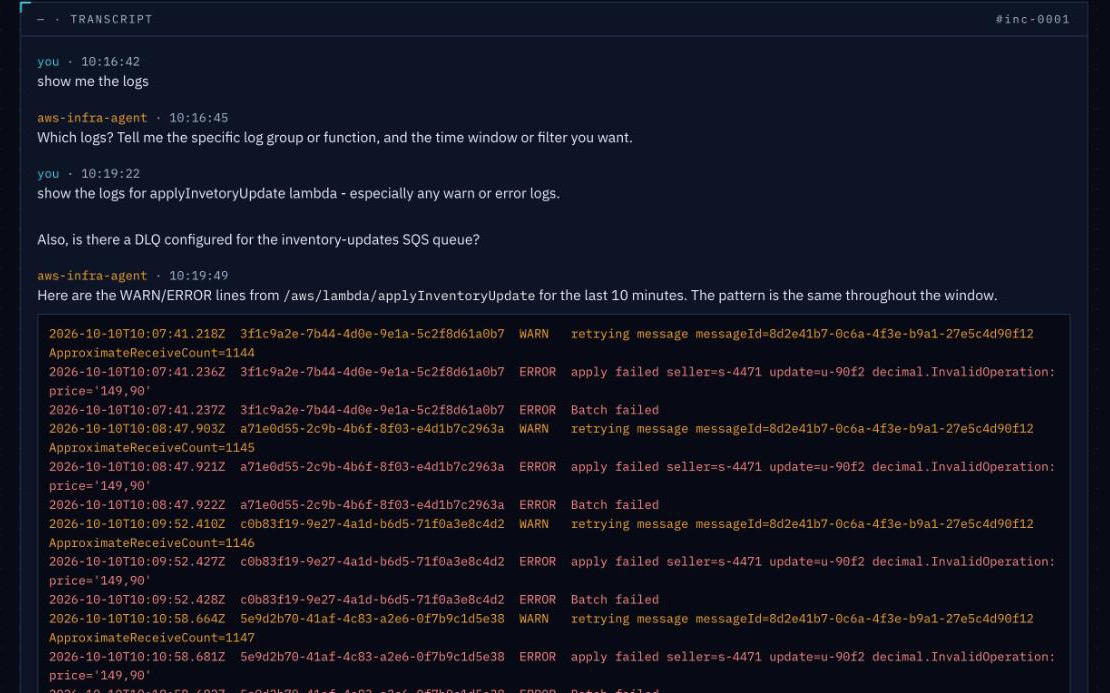
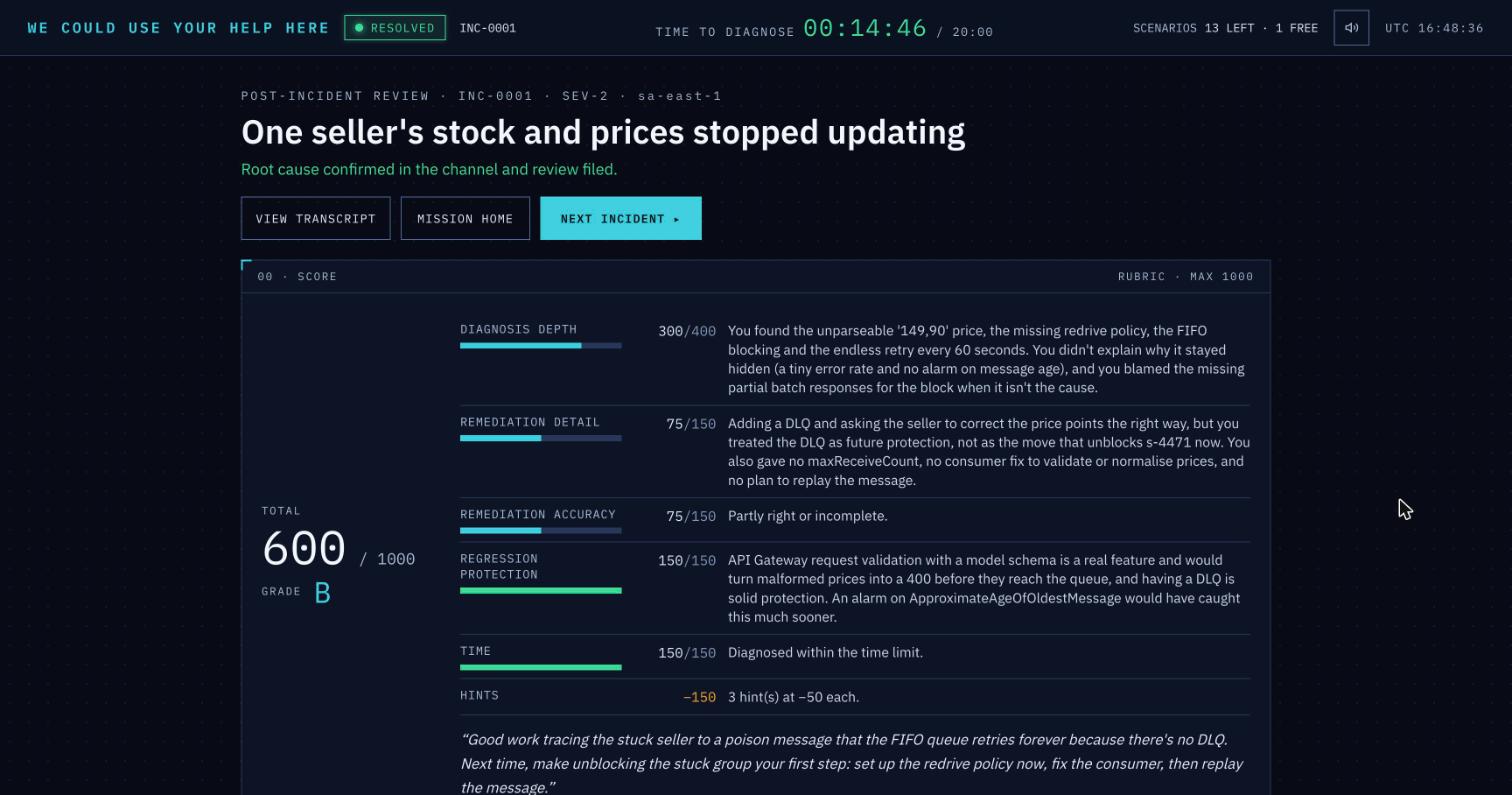
You investigate the incident by chatting with aws-infra-agent, an AI game master that plays the environment. Ask it for logs and you get log lines. Ask for a bucket policy and you get raw JSON. Ask it to "just check everything" and it tells you to be more specific, the way a tired and stressed colleague might. You win by accurately figuring out the root cause, and you score bonus points by proposing a correct fix and a guardrail that would stop it happening again, which I called a "regression protection". This folds in what I consider to be a critical but underserved part of the incident manage workflow, and that is follow-ups that solve the underlying cause of the issue.
Here's part of one of my own incidents, a stuck seller on a FIFO queue in sa-east-1, and the review it got at the end:
How the game master works
Every scenario is a Markdown file with a public half and a hidden half. The public half is what the player sees. It has a title, the symptom in the reporter's words, an architecture diagram and a few initial clues. These set the overall scene. The hidden half is the case file. It holds the facts, the evidence each log or metric would show, the root cause, the accepted diagnoses, three hints and the write-up.
The game master gets the whole file as its system prompt, plus a set of rules. It has to answer the way the systems would, with logs as log lines and policies as JSON. It must never state the root cause, and a partial guess only gets a nudge like "consistent with what you're seeing". It can invent any detail the case file doesn't cover, but it can never contradict the hidden facts.
When the player names the root cause, the game master adds a control tag like <verdict status="solved"/> to the end of its reply. The server strips these tags out of the stream before they reach the browser and uses them to drive the UI. The clock stops, a green ROOT CAUSE CONFIRMED banner sweeps across the screen (worked hard on the UX for this one, trying to capture the feeling of relief when you finally figure out the root cause of an incident!), and the globe in the status panel does a victory lap 🎉
Version one: claude -p on local
The first version ran entirely on my laptop, with the Claude Code CLI in headless mode as the game master. There was no API key and no backend, just my Claude subscription. claude -p is surprisingly useful and flexible when used this way. Yay free (ish) incident scenario credits!
claude -p --model claude-opus-5-5 \
  --system-prompt-file <per-attempt prompt> \
  --output-format stream-json --verbose --include-partial-messages \
  --setting-sources "" --disable-slash-commands --strict-mcp-config \
  --mcp-config mcp/aws-docs.json --tools "" --allowedTools mcp__aws-docs \
  --session-id <uuid>      # first turn
  # --resume <session_id>  # every turn after that
Some notes on this command
--system-prompt-filereplaces Claude Code's own coding prompt, so the model plays aws-infra-agent rather than a coding assistant.- Take note of
--setting-sources ""and--strict-mcp-config. I have global hooks and plugins installed, and without these two flags they would run on every chat turn and could leak into the answers. --output-format stream-jsonwith--include-partial-messagesgives token-level deltas, which the route handler relays to the browser as Server-Sent Events.--resumekeeps the conversation and the prompt cache warm between turns. If a session goes missing, the engine starts a new one and replays the transcript from SQLite.- The tests never call the real CLI. They point at a fake
claudescript that emits the same stream-json, usage events and control tags.
The AWS Documentation MCP server
The biggest risk with an AI game master is that it confidently makes up (hallucinates) AWS behaviour. This is supposed to be an AWS learning tool and so accuracy is paramount - let's be honest, AWS is complicated enough as it is without being misinformed by a supposed expert training tool!
The main guard against this was use of AWS Documentation MCP server from AWS Labs. It gives the model search_documentation, read_documentation and recommend tools over the official docs, and it takes one small config file to run:
{
  "mcpServers": {
    "aws-docs": {
      "command": "uvx",
      "args": ["awslabs.aws-documentation-mcp-server@latest"],
      "env": { "FASTMCP_LOG_LEVEL": "ERROR" }
    }
  }
}
It ended up doing four jobs in this project.
- The game master looks up how a service behaves before it invents evidence, so a made-up error message matches the real one. Every lookup appears in the chat as a
docs.aws ▸ …chip. - The scorer uses it to check that a player's proposed guardrail is feasible, so "add an alarm on X" only scores if X is a real metric that can actually be found somewhere in the documentation.
- Another use of the docs tool is that the review page has a 250 to 450 word deep dive per AWS component, written from the docs. This the main bit of "here's some extra learning material" that can round out. a player's understanding of the behaviour and mechanics of AWS component in question.
- Lastly, the scenario generator uses the docs tool to back every AWS claim in a scenario, which I'll expand on later.
One wrinkle came with the move to the cloud. You can't attach an MCP server to a Bedrock InvokeModel call (we're not getting into AgentCore just yet!), so I reimplemented the two tools I needed in-process as ordinary Bedrock tool definitions. They have the same names and inputs as the MCP tools, so the docs chips in the UI didn't need to change. They're stricter than the originals. Reads only go to docs.aws.amazon.com, pages are cut to 8,000 characters and cached in memory, and a turn gets at most 3 lookups. That keeps the token bill under control. There is a risk here of "knowledge truncation" but I haven't found one yet. The next level up though would be to find a way to provision the MCP "as-is" on the backend, likely using Bedrock AgentCore primitives.
Generating the scenarios
Six hand-written scenarios were enough to prove the game was fun. A paid product needed many more, and I was never going to write a 100+ incident scenarios by hand.
So I wrote down what a good scenario is made of. A SCENARIO_ANATOMY.md file is now about 1,000 lines. It defines the severity levels, reporter voices such as a customer, support, an alarm or the finance team, how many clues and investigation steps each difficulty gets, how much the game master gives away at each difficulty, how two-fault incidents work, and which AWS services are in scope.
Each scenario starts as a cell in a backlog file. A cell is a short brief built from a fixed vocabulary:
{
  "cell": "dynamodb-gsi-throttling-backpressure",
  "difficulty": 4,
  "severity": "SEV-1",
  "region": "eu-central-1",
  "reporter": "alarm",
  "culprits": ["DynamoDB"],
  "faults": 1,
  "faultClass": ["limits-quotas"],
  "mechanism": "gsi-write-throttling-backpressures-table",
  "trigger": "traffic-growth",
  "concealment": ["wrong-metric"],
  "setting": { "industry": "logistics", "architecture": "event-driven" },
  "notes": "Base table has headroom; the GSI's write capacity doesn't."
}
A planning session filled the backlog against coverage targets. Those include a spread across all 30 AWS regions. For fun, there is a globe in the mission screen that animates to the incident region, so a variety of regions is nice. Also included is each core service as the culprit three to six times at different difficulties, about 30% two-fault incidents at the hard end (yes, that means two separate, distinct faults or misconfigurations to find!), and about 15% GenAI incidents on Bedrock and SageMaker AI. Every mechanism has to be a real, documented AWS behaviour, and a lint rule rejects two scenarios with the same culprit and mechanism.
The generate-scenario skill then turns one cell into one scenario. These are the rules that make it trustworthy:
- Every AWS behaviour, default, limit, error string, metric name and CLI output in the scenario must come from a docs page it read in that run. The URLs go in a hidden Sources section.
- If the docs don't support the cell's mechanism, it rejects the cell and says why. It doesn't get to invent a substitute.
- It checks that every service in the scenario exists in the cell's region. Some regions are opt-in or are missing services, and an incident in a region where the service doesn't exist would be embarrassing.
- It designs backwards from the root cause. The root cause comes first, then the evidence and the steps an expert would take. The title, symptom and clues come last, so they don't give the answer away.
My first attempt ran a batch of scenarios in one long interactive session, and that didn't scale. Every docs page the session read stayed in its context, and a 15-scenario batch reached about 600k tokens. So the batch script now starts a fresh headless claude -p run per cell, three at a time:
claude -p "Run the generate-scenario skill for backlog cell $cell. …" \
  --model "$MODEL" \
  --strict-mcp-config --mcp-config mcp/aws-docs.json \
  --permission-mode acceptEdits \
  --allowedTools Read Write Edit Glob Grep mcp__aws-docs \
  "Bash(pnpm scenarios:lint *)" "Bash(pnpm scenarios:deep-dive *)" \
  "Bash(pnpm scenarios:index)" "Bash(pnpm vitest run *)" \
  >"$LOG_DIR/$cell.log" 2>&1
Some notes on this code
--strict-mcp-configkeeps my plugin MCP servers out again, so each run only sees the AWS docs tools.- A headless run can't ask for permission, so
--allowedToolsis the full list of what it can do. It can read and write files, use the docs tools, and run the project's own lint, deep-dive, index and test commands. Nothing else. - Each run writes a report to its own log file. The report lists the warnings it accepted, any changes to the backlog cell, the deep dive's cost, or why it rejected the cell.
Generated scenarios land as drafts, and only I set them live, after reviewing each batch and playing a sample. The bank has 93 live scenarios today. The 6 originals are the free tier and the other 87 are paid.
When the AWS docs disagree with themselves
Making the generator cite a page for every claim had a side effect I didn't expect. It reads several pages per scenario, so it sometimes finds two pages that say different things, and it flags them in its report. I went back and re-read the pages for the two it flagged, and both conflicts are still in the docs today.
S3 replication and SSE-KMS objects
The What does Amazon S3 replicate? page lists what S3 replicates by default. One of the bullets is:
Objects encrypted using customer provided keys (SSE-C), objects encrypted at rest under an Amazon S3 managed key (SSE-S3) or a KMS key stored in AWS Key Management Service (SSE-KMS).
That bullet links to the page on replicating encrypted objects, which says the opposite:
By default, Amazon S3 doesn't replicate objects that are encrypted with SSE-KMS or DSSE-KMS.
Ok what now!? 😬
To replicate SSE-KMS objects you have to opt in. The rule needs SourceSelectionCriteria with SseKmsEncryptedObjects set to Enabled, the destination needs a ReplicaKmsKeyID, and the replication role needs KMS permissions. The specific page is the right one. The replication API has that opt-in flag, and the troubleshooting page tells you to tick "Replicate objects encrypted with AWS KMS" in the console.
So this one became a scenario. A health insurer's claims bucket switches its default encryption to SSE-KMS, and nobody touches the replication rule. For three weeks the analytics replica gets no new claims files. S3 never attempts to replicate the files, so they get no replication status at all, and nothing shows up as pending or failed. Going by the overview page, you'd expect it to just work. Oops, was that a scenario spoiler? 🙊
SES bounce and complaint thresholds
The SES enforcement FAQ says when your account gets into trouble:
If your bounce rate is 5% or greater, we'll place your account under review. If your bounce rate is 10% or greater, we might pause your account's ability to send additional email
It gives 0.1% and 0.5% for complaints in the same way. The page on reputation alarms agrees, and tells you to alarm at 5% and 0.1%. But the page on automatically pausing a configuration set has this note:
If the overall bounce rate for your Amazon SES account exceeds 10%, or if the overall complaint rate for your Amazon SES account exceeds .5%, your Amazon SES account is automatically placed under review.
That note uses the pause thresholds as the review thresholds. If you tuned your alarms from that page alone, you could set a bounce alarm at 8% and be under review before it ever fired. The same note does tell you to pick values "far below these rates", which helps, but the numbers are still wrong.
The generator went with the FAQ, since two other pages agree with it. In the scenario, a college's marketing team sends a campaign to an old prospect list, the bounce rate passes 5% and the account goes under review. The review notices go to an inbox nobody reads. The bounce rate is still above 10% when the review ends, so SES pauses sending for the whole account, and the students stop getting their enrolment receipts.
Likely, this is just a case of pieces of AWS documentation not keeping track of changes in the platform. In an upcoming iteration, I will use my own AWS account to verify the current behaviour for these types of things and use the outcome to ratify the scenario parameters.
Workshopping the Mission Control look
Before writing any code, I used Claude Design to mock up eight different themes on a design canvas, all showing the same case, "The Email That Wouldn't Save":
- Noir Case File
- Mission Control
- Retro Terminal
- Forensic Lab
- Console Parody
- Blueprint
- Modern Minimal
- Roman Quaestor (quaestor remains the internal project name!)
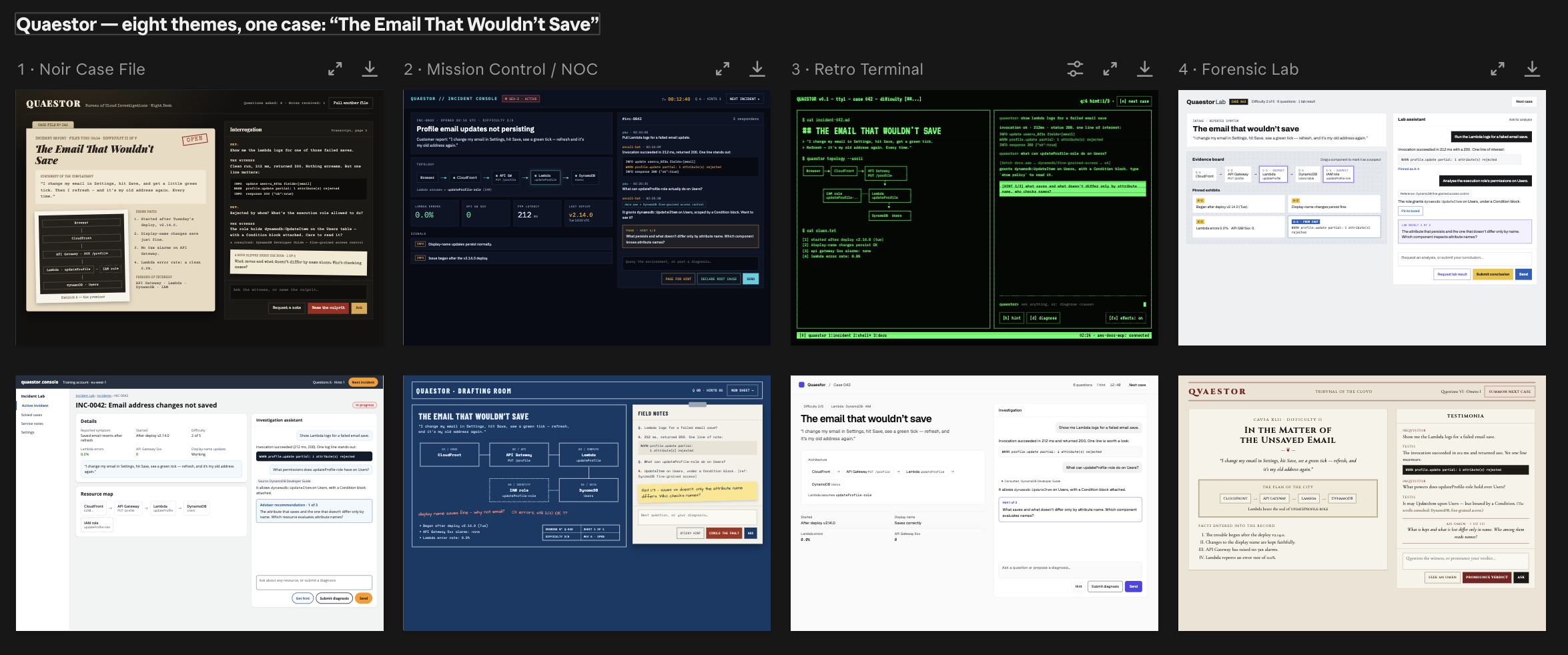
Mission Control won because it's closest to (albeit a sci-fi ramping up of) a real on-call work, so what you practise in the game carries over. The brief became "a network operations centre at 3am, in the middle of an incident". The next row on the canvas mocked up all five screens in that theme: the systems check, the incoming page, the active incident, the stand-down dialog and the post-incident review.
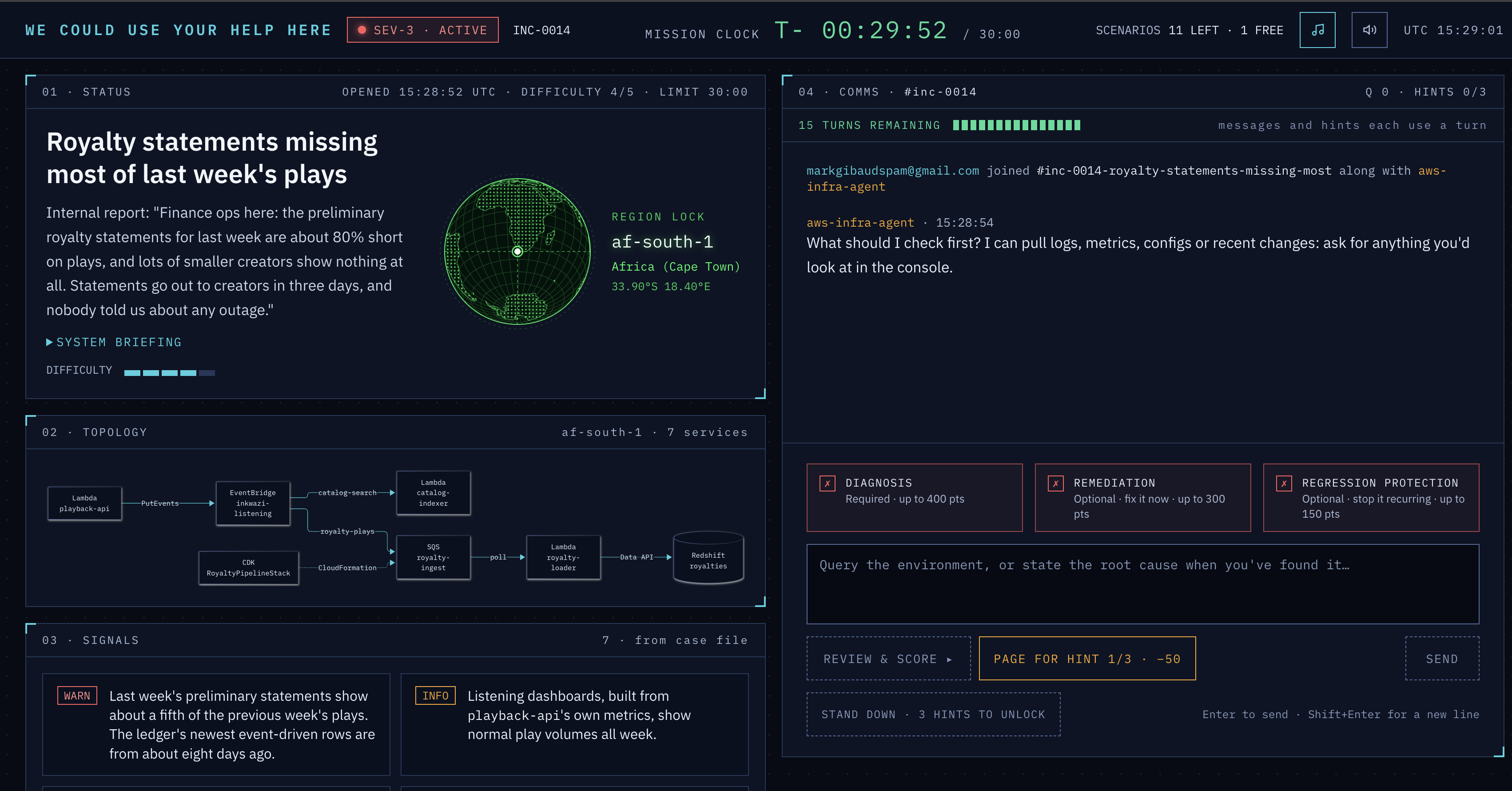
The look has a small set of rules. The colours are CSS variables mapped into Tailwind v4, with a near-black navy background, cyan for actions, amber for warnings and hints, red for alarms and green for resolved. Labels, logs and timestamps use IBM Plex Mono in uppercase, and longer prose uses IBM Plex Sans. Corners are square, borders are 1px, and there are no gradients or rounded cards. Glow only appears on things that are live or alarming.
I also ran a contrast audit against WCAG. Body text, labels and accents are at least 7:1, and every status has a text label as well as a colour, so SEV-2 · ACTIVE never relies on red alone. All the animation respects prefers-reduced-motion.
Then I added a few things that make it feel like Mission Control. A wireframe globe, drawn with d3-geo, spins and locks onto the incident's AWS region. The region also goes into the game master's prompt, so the ARNs and log group names it invents match it. The mission clock counts down through green, amber and red thirds of the time limit, with a heartbeat pulse in the last third. A fake system log types away behind the incoming page, with the occasional pantry-iot: coffee-maker-03 line. And the systems check has a WARM CUP OF COFFEE row that is hard-coded to GO 😎
"Borrowing" StarCraft sound effects
If you played StarCraft, you'll know "Nuclear launch detected" is one of the most stressful sentences in gaming (unless you're the one launching!). The StarCraft sound effects fit nicely into the (Space?) Mission Control theme, so I've borrowed them. (and yes, I know that browser tabs making a noise is sometimes considered rude - don't worry, you can turn sounds off in the game!)
nuclearlaunchdetected.com is a fan site with a soundboard of StarCraft II clips, and the clips sit in a public S3 bucket. A small pnpm sounds script downloads the ones the game needs into public/sounds/sc2/. The mapping from game events to clips is a plain object:
export const SOUND_EVENTS = {
  systemsCheck: ["sc2/SCV_Ready00.mp3", "sc2/SCV_Ready01.mp3"],
  budgetLow: ["sc2/Alert_TerranNeedMoreMinerals.mp3"],
  incomingPage: ["sc2/Marine_Help00.mp3"],
  acknowledge: ["sc2/Marine_Ready00.mp3"],
  transmission: ["sc2/IncomingTransmission.mp3"],
  timeLimit: ["sc2/Alert_TerranBaseUnderAttack.mp3"],
  rootCause: ["sc2/Alert_TerranUpgradeComplete.mp3"],
  error: ["sc2/Alert_TerranBuildError.mp3", "sc2/SCV_CantBuild00.mp3"],
  // ...
} as const satisfies Record<string, readonly string[]>;
So a marine calls for help when you're paged. Passing the time limit plays "Our base is under attack", and finding the root cause plays "Upgrade complete". "Incoming transmission" plays to the end before the game master's reply starts to stream, so every reply sounds like it's coming over comms. Receiving a tip, naturally, plays "Reseach Complete" 😆
The clips belong to Blizzard, and the credit goes to them and to the fan site that collected them!
The background music is my own, and there are no audio files for it. The Web Audio API synthesises it in the browser, and it follows the mission clock. Green has a low drone and sonar pings. Amber adds a heartbeat and ticking. Red adds dissonance and a faster pulse, and overtime adds a muffled alarm. When you find the root cause, the tension cuts out and a burst of rising blips and a major chord play instead.
An example of a newly-entered scenario:
The serverless backend
Playing on my own Claude subscription was fine for one person. To share it with the world I needed a hosted version, and I wanted it serverless, with no servers to patch and almost no bill when nobody is playing.
I kept both versions working. The game engine only talks to two interfaces, Store and GameMasterLlm. Locally they're backed by SQLite and claude -p, and in the cloud by DynamoDB and Bedrock. One environment variable, QUAESTOR_MODE=cloud, switches between them. There are various budget alarms and infra controls to guard against runaway Bedrock usage 💸
Next.js on lambda
The whole Next.js app runs as one lambda function from a container image, using the AWS Lambda Web Adapter. The adapter turns lambda invocations into ordinary HTTP requests to the Next.js server and streams the response back. Game master turns are Server-Sent Events, so streaming was a must.
FROM node:24-slim
COPY --from=public.ecr.aws/awsguru/aws-lambda-adapter:1.1.0 /lambda-adapter /opt/extensions/lambda-adapter
WORKDIR /app
COPY --from=build /app/.next/standalone ./
ENV NODE_ENV=production \
    PORT=8080 \
    AWS_LWA_PORT=8080 \
    AWS_LWA_INVOKE_MODE=response_stream
# Lambda's filesystem is read-only except /tmp, so Next.js's cache directory points there.
RUN rm -rf /app/.next/cache && ln -s /tmp/next-cache /app/.next/cache
CMD ["sh", "-c", "mkdir -p /tmp/next-cache && exec node server.js"]
And the CDK code for the function:
const web = new lambda.DockerImageFunction(this, "Web", {
  functionName: "quaestor-web",
  code: lambda.DockerImageCode.fromImageAsset(APP_ROOT, {
    platform: Platform.LINUX_ARM64,
  }),
  architecture: lambda.Architecture.ARM_64,
  memorySize: 1024,
  // A game-master turn is capped at 4 minutes; deep-dive generation at 7.
  timeout: cdk.Duration.minutes(10),
  // Caps simultaneous turns, and with them how fast the model bill can grow.
  reservedConcurrentExecutions: 25,
  // ...
});

const url = web.addFunctionUrl({
  authType: lambda.FunctionUrlAuthType.NONE,
  invokeMode: lambda.InvokeMode.RESPONSE_STREAM,
});
Some notes on this code
- CloudFront drops an origin that sends nothing for 60 seconds, and a game master turn that's busy reading docs can easily go quiet that long. So SSE turns send a
: pingcomment every 15 seconds. The slow JSON routes for scoring and deep dives stream whitespace before their JSON for the same reason. - Static files and sounds come from S3, through a CloudFront origin group that falls back to the lambda on a 403 or 404. Before that change, one page load could cause several lambda cold starts just to fetch JavaScript files.
- The reserved concurrency of 25 also caps how many model calls can run at once, which caps any runaway bills at least somewhat. Once I see errors in the logs relating to the "capped max scale" I will re-evaluate!
Bedrock
In the cloud the game master is Opus 5.5 on Amazon Bedrock, through global cross-Region inference profiles. The free scenario runs on Sonnet 5.5 with max 7 turns, and paid packs get Opus 5.5 with 15 turns. Unlike claude -p --resume, Bedrock is stateless, so every turn resends the transcript. Prompt-cache breakpoints on the system prompt and the newest message keep that relatively cheap, but AI optimizing is a fun game I haven't dived too far into yet!
The IAM policy allows InvokeModel on those two inference profiles and the models they route to, and nothing else. A global profile can serve a request from any region and uses region-less model ARNs, so the policy needs both forms of the model ARN. AWS IAM is always fun!
DynamoDB
All game data lives in one DynamoDB table, modelled with Single-table Design using ElectroDB. I went for readable keys, because INCIDENTATTEMPT#0000000042 is much easier to find in the console than a hash.
| PK | SK | What it stores |
|---|---|---|
PLAYER#<pid> |
PLAYER#<pid> |
a player, with credits and an email once they buy |
INCIDENTATTEMPT#<id> |
INCIDENTATTEMPT#<id> |
one incident attempt |
INCIDENTATTEMPT#<id> |
MESSAGE#<id> |
the chat messages |
INCIDENTATTEMPT#<id> |
TURNLOCK |
a turn lock with a TTL |
PAYMENT#<checkout session> |
PAYMENT#<checkout session> |
an applied Stripe payment |
DAY#<date> |
DAY#<date> |
free scenarios started and model spend that day |
CONFIG |
killswitch / stripe-mode |
runtime switches |
A GSI groups each player's attempts and payments. TTLs enforce the retention periods in the privacy policy. The web function's role only gets the DynamoDB actions ElectroDB actually uses, so no scans and no streams.
Payments and sign-in
Stripe Checkout sells packs of 15 scenarios. The game passes the player id to Checkout as the client_reference_id, and the webhook adds the credits once per Checkout session. Both the test and live Stripe keys are deployed, and an item in the table picks which one is active, so I can switch modes from the CLI without a redeploy. Amazon SES sends single-use sign-in links, so buyers can restore their packs on another device. Everyone else stays anonymous behind a signed cookie.
The kill switch
A game that calls an LLM on every turn needs protection against a runaway bill! There are caps on turns and hints, a daily cap on free scenarios, a daily model budget that stops new scenarios once it's spent, and the reserved concurrency above. The backstop is a kill switch.
An AWS Budget publishes to an SNS topic when actual spend crosses 100% of the monthly budget. Budgets doesn't send threshold events to EventBridge, so SNS it is. The topic invokes a small lambda that does two things:
// 1. The hard stop: deny Bedrock on the web function's role.
await iam.send(
  new PutRolePolicyCommand({
    RoleName: process.env.WEB_ROLE_NAME,
    PolicyName: process.env.CUTOFF_POLICY_NAME,
    PolicyDocument: JSON.stringify({
      Version: "2012-10-17",
      Statement: [
        {
          Sid: "BudgetReachedNoBedrock",
          Effect: "Deny",
          Action: [
            "bedrock:InvokeModel",
            "bedrock:InvokeModelWithResponseStream",
          ],
          Resource: "*",
        },
      ],
    }),
  }),
);

// 2. The friendly part: players see "Mission Control is paused" instead of errors.
await dynamo.send(
  new PutItemCommand({
    TableName: process.env.TABLE_NAME,
    Item: {
      PK: { S: "CONFIG" },
      SK: { S: "killswitch" },
      at: { S: new Date().toISOString() },
    },
  }),
);
Some notes on this code
- Budgets only evaluates when billing data refreshes, which can take hours. The kill switch is a backstop, and the daily budget and concurrency cap are the fast guards - I am just makign the trade-off here that if the game becomes too popular too quickly, some users might be denied!
- Giving a lambda
iam:PutRolePolicyis risky, so the web role has a permissions boundary. It caps the role at logs, the game table, the two models and SES, so even a buggy kill switch can't widen it. - Locally-runnable pnpm tasks
pnpm bedrock:enableruns the deny, andpnpm bedrock:disableruns the kill switch by hand.
And finally
A few things from this project I'll reuse. Writing a spec for the scenarios did more for their quality than any prompt tweaking. Making the model cite the AWS docs for every claim kept the game from teaching made-up behaviour, and found two places where the docs contradict each other. One fresh headless session per scenario worked far better than one long session. And caps, budgets and a kill switch were cheap to build before launch.
If you'd like to take a shift, there's a free incident waiting at wecoulduseyourhelphere.com.
Thanks for reading! See also:
- The AWS Documentation MCP server: https://github.com/awslabs/mcp
- The AWS Lambda Web Adapter: https://github.com/awslabs/aws-lambda-web-adapter
- ElectroDB: https://electrodb.dev
- The StarCraft soundboard: https://nuclearlaunchdetected.com
Thanks to the AWS Labs folks for the MCP server, and to whoever runs nuclearlaunchdetected.com for making this game sound cool 😎
About the author
- Principal AWS Platform Engineer. Passionate about ReactNative & AWS Serverless Technologies.
Comments
Join the discussionNo comments yet. Be the first to comment.


